
AI Receptionist for Small Business: How It Works & Key Benefits

The 30-second version
An AI receptionist is software that answers every inbound call, books appointments, and texts your team a summary — 24/7, without overtime pay. Unlike a human answering service, it responds instantly, gives consistent information, and can confirm bookings in real time. Ahoya sets up from your website URL in minutes and gives you a real phone number. Plans start at $49 per month with a free trial. For a small business owner who cannot stop mid-job to answer the phone, it is the simplest way to stop losing callers to competitors.
In this article
- 01What is an AI Receptionist and How Does it Work?
- 02Benefits of Implementing an AI Receptionist for Small Businesses
- 03Key Features to Look for in an AI Receptionist Solution
- 04How an AI Receptionist Can Enhance Customer Experience
- 05Comparing AI Receptionists to Traditional Receptionist Services
- 06Overcoming Common Concerns About AI Receptionists
- 07Getting Started with an AI Receptionist for Your Small Business
What is an AI Receptionist and How Does it Work?#
An AI receptionist is a software-based system that handles customer inquiries and front-office tasks — answering calls, booking appointments, logging requests, and notifying your team — without a human sitting at a desk. For a small business owner who is also the technician, therapist, or attorney doing the actual work, that distinction matters. Every call you miss while you are with a client is a potential customer who calls your competitor next.
A traditional virtual receptionist is usually a human working remotely, handling calls on behalf of multiple businesses. An AI receptionist does the same front-office job, but runs on software trained to understand natural speech, follow a script built around your business, and take action automatically.
Here is how a typical AI receptionist handles an inbound call:
- A customer calls your business phone number.
- The AI answers immediately, greets the caller by your business name, and asks how it can help.
- It listens, understands the request — booking an appointment, asking about hours, leaving a message — and responds in plain, conversational language.
- If the caller wants to book, the AI checks availability and confirms the appointment.
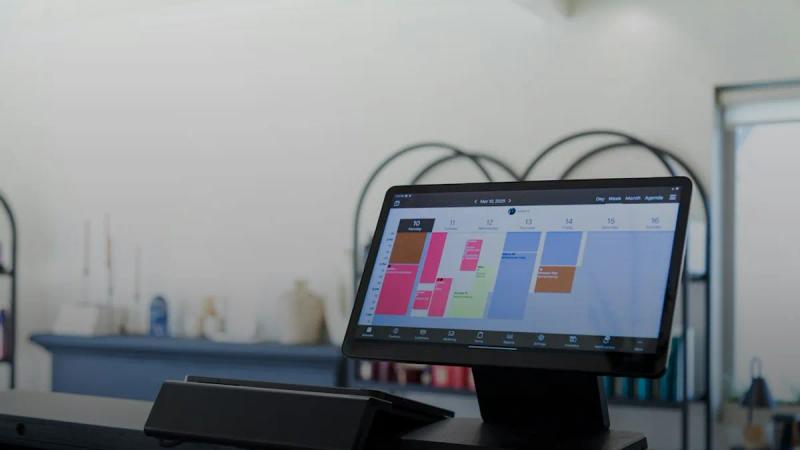
- It then texts or notifies your team with a summary of the call.
With Ahoya, setup starts from your website URL. The system reads your existing content — services, hours, location — and uses that to configure itself. You get a real phone number, not a forwarding workaround, and the whole process takes minutes rather than weeks.
Benefits of Implementing an AI Receptionist for Small Businesses#
The most immediate benefit is coverage. A dental office that closes at 5 p.m. still gets calls at 7 p.m. from patients trying to book a cleaning or report a toothache. A plumbing company gets emergency calls on Sunday morning. An AI receptionist handles those calls the same way it handles a Tuesday afternoon call — calmly, accurately, and without overtime pay.
Beyond coverage, here are the practical benefits small business owners notice most:
- No missed calls during busy periods. When you are on a job, in a session, or with a patient, calls still get answered.
- Consistent information. The AI gives every caller the same accurate answer about your hours, pricing, or services — no one puts a caller on hold and guesses.
- Appointment booking without back-and-forth. Callers book while they are already on the phone, which reduces no-shows and phone tag.
- Automatic team notifications. Your staff gets a text summary of every call, so nothing falls through the cracks.
- Lower overhead. You get front-office coverage without adding a salary, benefits, or training time to your budget.
The compounding effect matters for small business growth. A practice that misses even a handful of calls a week is leaving real revenue on the table. Capturing those calls consistently adds up over months.
Key Features to Look for in an AI Receptionist Solution#
Not every AI receptionist product is built the same way. When you are evaluating options, focus on these specifics:
Call handling quality. The AI should understand natural speech, handle accents, and manage a caller who changes their mind mid-sentence. Ask for a demo call before committing.
Appointment booking. Look for a system that can confirm bookings in real time, not just collect a name and number for a callback.
Team notifications. After every call, your team should receive a clear summary — caller name, reason for calling, any action taken.
Setup speed. A solution that takes weeks of configuration is a liability for a small business. Look for something that can be live within a day.
Transparent pricing. Ahoya's plans start at $49 per month, with higher tiers at $179 and $399 per month depending on call volume and features. There is a free trial so you can test it before spending anything.
A real phone number. Some services only forward calls, which creates reliability issues. A dedicated number tied to the AI is cleaner and more professional.
Answer Every Call — Starting Free
Start Free TrialHow an AI Receptionist Can Enhance Customer Experience#
Customers do not think about your staffing situation. They call, and they expect someone to answer. When they reach a voicemail at 6:30 p.m. on a Friday, many of them simply move on.
24/7 call answering removes that friction. A caller who reaches a friendly, knowledgeable voice at any hour feels taken care of, even if the AI is handling the conversation. The key is that the AI sounds natural and actually solves the problem — it does not just collect a message and promise a callback.
Consider a law firm. A potential client calls after hours about a time-sensitive matter. An AI receptionist can gather the details, confirm the firm's practice areas, and book a consultation for the next morning. The caller feels heard. The attorney wakes up to a full summary and a booked appointment instead of a voicemail to decode and return.
Or consider a salon. A client wants to book a color appointment for Saturday. The AI checks availability, books the slot, and sends a confirmation. The stylist never had to stop a cut to answer the phone.
That kind of experience builds trust. It signals that your business is organized and responsive, which is exactly the impression a small business needs to compete with larger operations.
Comparing AI Receptionists to Traditional Receptionist Services#
Here is a straightforward comparison across the options most small businesses consider:
| AI Receptionist | Answering Service | In-House Hire | |
|---|---|---|---|
| Monthly cost | $49–$399 | $100–$500+ (often per-minute) | $2,500–$4,000+ salary + benefits |
| Hours covered | 24/7, every day | Varies by plan | Business hours only |
| Setup time | Minutes to hours | Days to weeks | Weeks (hiring + training) |
| Consistency | Same response every call | Depends on the agent | Depends on the employee |
| Appointment booking | Yes, in real time | Rarely; usually message-taking | Yes |
| Team notifications | Automatic after every call | Manual or batched | Manual |
A human answering service can handle complex or emotionally sensitive calls better than any AI today — that is a fair point. But for the majority of inbound calls a small business receives — booking requests, hours questions, address lookups, service inquiries — an AI receptionist handles them accurately and at a fraction of the cost.
Hiring a receptionist makes sense when your call volume and complexity justify a full-time role. Until that point, you are paying for a lot of idle time.
Overcoming Common Concerns About AI Receptionists#
"Will callers know they are talking to an AI?"
Most AI receptionists are transparent about what they are if asked directly, and that is the right approach. What callers care about more is whether their question gets answered and whether they can book an appointment. A clear, helpful AI response beats a rushed human one.
"What if the AI gets something wrong?"
AI receptionists are configured around your specific business information. The more accurate your setup, the more accurate the responses. Ahoya pulls from your website to build that foundation. You can review call logs and adjust settings as you go.
"Is it too impersonal for my industry?"
Medical offices, law firms, and mental health practices all handle sensitive calls. An AI receptionist is not the right tool for every moment in those calls — a patient in crisis needs a human. But for scheduling, intake questions, and after-hours coverage, AI handles the volume reliably and frees your staff for the conversations that actually require human judgment.
"What if I already have a part-time receptionist?"
An AI receptionist covers the gaps your part-time employee cannot — evenings, weekends, and the moments when they are already on another call. The two work well together.
Getting Started with an AI Receptionist for Your Small Business#
Getting started with Ahoya takes four steps:
- Go to ahoya.ai and start your free trial. No credit card required upfront.
- Enter your website URL. Ahoya reads your site and builds an initial configuration based on your services, hours, and location.
- Review and adjust your settings. Confirm the information is accurate, add any specific instructions — how to handle urgent calls, which services to promote, where to send notifications.
- Go live on a real phone number. Point your existing number to Ahoya or use the number Ahoya provides. Calls start getting answered immediately.
From that point forward, every call gets answered. Every booking gets logged. Your team gets notified. And you get to focus on the work that actually requires you.
If you are a home services contractor, a salon owner, a dentist, or a solo attorney who has ever let a call go to voicemail because you were busy, an AI receptionist is worth testing. The free trial costs you nothing. Missing another week of calls might.
Frequently asked questions
What does an AI receptionist actually do on a phone call?
It answers immediately, greets the caller using your business name, and handles common requests — booking appointments, sharing hours or pricing, taking messages. After the call, it texts your team a summary. The conversation happens in plain, natural language, so callers are not navigating a clunky phone tree.
How is an AI receptionist different from a traditional answering service?
A traditional answering service uses remote humans who work in shifts, which means variable quality and per-minute costs that add up fast. An AI receptionist runs on software, so it is available every hour of every day at a flat monthly rate. It can also confirm bookings in real time rather than just taking a message for a callback.
Is an AI receptionist good enough to handle real customer calls?
For the calls most small businesses receive — booking requests, hours questions, service inquiries — yes. Modern AI understands natural speech, handles accents, and follows a script built around your specific business. The best way to judge quality is to request a demo call before committing to any service.
How long does it take to set up an AI receptionist for a small business?
With Ahoya, setup starts from your website URL. The system reads your existing content — services, hours, location — and configures itself. You get a real dedicated phone number, and the whole process takes minutes rather than days or weeks. No lengthy onboarding or technical team required.
How much does an AI receptionist cost compared to hiring someone?
An in-house receptionist typically costs well over $2,500 per month in salary alone, plus benefits and training. Ahoya's plans start at $49 per month, with higher tiers at $179 and $399 depending on call volume and features. There is a free trial so you can test it before spending anything.
Written by
Ahoya Team
Ahoya editorial
Never miss another customer call
Ahoya answers every call, books appointments, and texts your team — set up from your website in minutes.
Get new playbooks by email