

Help center
SMS appointment reminders
3 min · updated Jul 24, 2026
In short
Once you confirm a booking, Ahoya texts the customer a reminder an hour before the appointment and tracks whether it was delivered — so fewer people no-show.
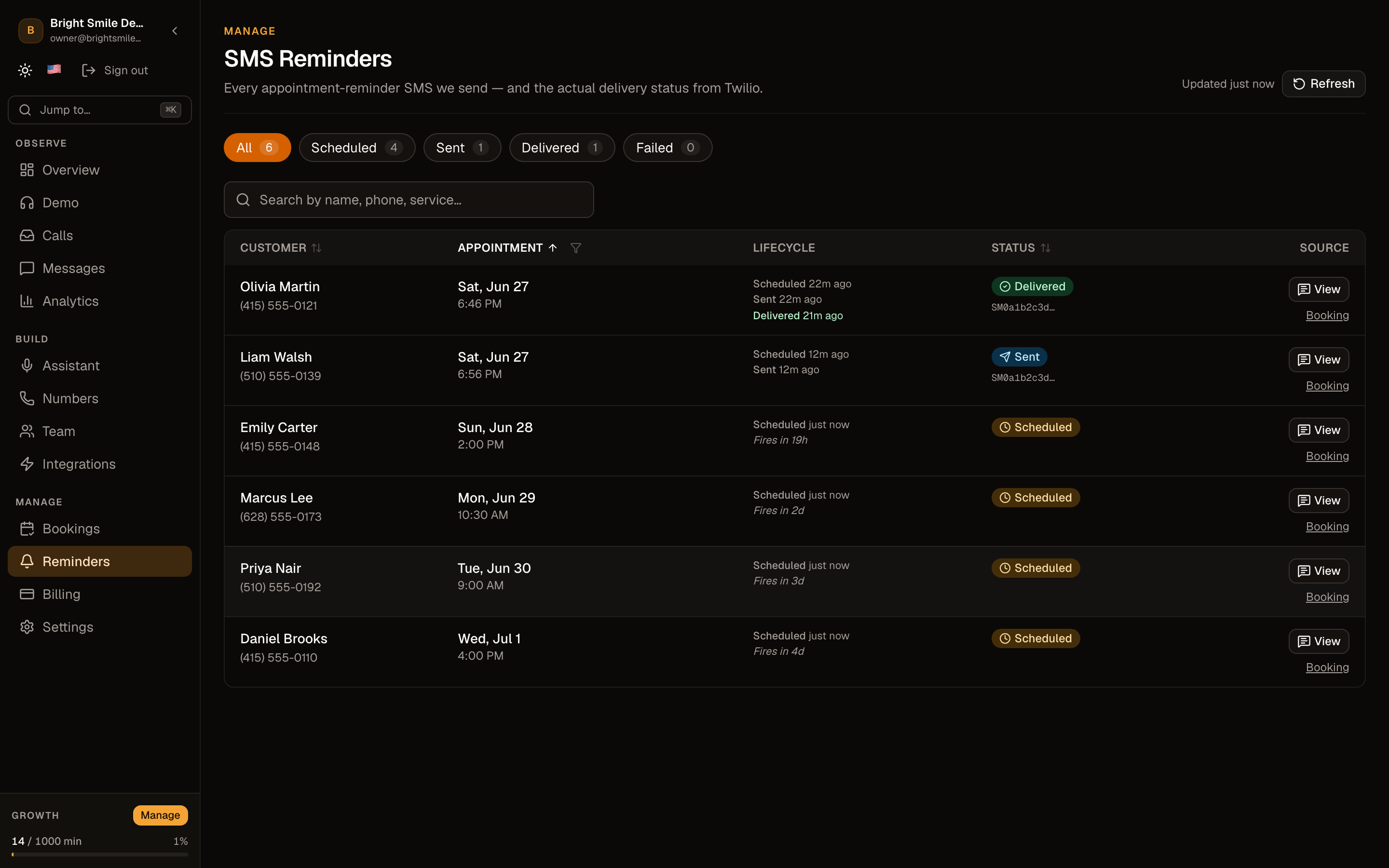
01Confirm the booking first
Reminders are tied to confirmed bookings. When you confirm a booking that has a phone number and a start time, a reminder is scheduled automatically.
SMS reminders are a Growth-plan feature.
02The reminder sends an hour before
Ahoya sends the text about one hour before the appointment. It re-checks the booking at send time, so a booking you archived or changed won't fire a stale reminder.
03Track delivery
Open SMS reminders in the dashboard to see each reminder's status — scheduled, sent, delivered, or failed — with a plain-language explanation for the common failure reasons.
Frequently asked questions
What if the reminder fails to deliver?
The SMS reminders screen shows the failure and why — for example an unreachable landline or a carrier block — so you can follow up another way.
Can I change when the reminder sends?
Reminders currently send about an hour before the appointment. If you need a different cadence, let us know at [email protected].
See also
Related guides
Ready to try it? Get a working AI receptionist in about five minutes.
Start free